Proper Image Attribution: How to Cite a Picture in APA, MLA, and Slides
Have you ever found the perfect photo online and wondered how to use it without getting into trouble? Giving credit where it is due is a super important skill. Whether you are working on a school poster or a big presentation, knowing how to cite a picture makes your work look professional and honest. It tells your readers exactly where you found your information. Think of it like a “thank you” note to the person who took the photo or drew the art. In this guide, we will break down the steps so simply that anyone can do it. We will look at different styles like APA and MLA and even show you how to handle those tricky website images.
Quick Summary of Citation Basics
| Feature | APA Style | MLA Style |
| Primary Focus | Dates and Authors | Authors and Page/Site Names |
| Image Label | Figure (e.g., Figure 1) | Figure (e.g., Fig. 1) |
| In-Text Style | (Author, Year) | (Author Page/Slide) |
| Source List | References | Works Cited |
Export to Sheets
Why Learning How to Cite a Picture Matters
When you use a photo that isn’t yours, you are using someone else’s hard work. If you don’t say where you got it, people might think you made it yourself. That is called plagiarism, and it can be a big problem in school or at work. Learning how to cite a picture protects you and respects the artist. It also helps your readers find the original image if they want to see more. By following these rules, you show that you are a careful researcher who cares about doing things the right way.
Read more: antonio brown net worth
Understanding How to Cite a Picture in MLA
The Modern Language Association (MLA) style is very common in English and art classes. If your teacher asks you how to cite a picture in mla, they usually want to see the creator’s name first. You start with the artist’s last name, then their first name. After that, you put the title of the artwork in italics. If there is no title, just describe what is in the image. You also need to include where you saw it, like a museum or a book. It is all about making a clear path back to the original source.
How to Cite a Picture in MLA In-Text
Sometimes you need to mention the image right inside your paragraph. This is called an “in-text” citation. When learning how to cite a picture in mla in-text, remember to keep it brief. Usually, you just put the artist’s last name in parentheses right after you talk about the photo. For example, you might write (Smith). This tells the reader to go look for “Smith” in your big list at the end of the paper. It keeps your writing smooth while still being very helpful and honest about your sources.
How to Cite a Picture APA Style
The American Psychological Association (APA) style is used mostly in science and social studies. When you learn how to cite a picture apa, you will notice they care a lot about dates. You start with the creator’s name, followed by the year the image was made in parentheses. You also need to describe the format, like “[Photograph]” or “[Illustration],” in square brackets. This helps scientists and researchers know exactly what kind of visual aid they are looking at. It is a very organized way to keep track of your data.
Read more:sosoactive
Step-by-Step: How to Cite a Picture in APA
To do this correctly, find the author, the year, the title, and the site where you found it. If you are wondering how to cite a picture in apa for a digital file, always include the URL at the end. An example would look like: Creator, A. (Year). Title of work [Image type]. Website Name. URL. It looks a bit like a secret code, but once you practice a few times, it becomes very easy. Using this format ensures that your science project or history report meets the highest standards of academic writing.
How to Cite a Picture From a Website Easily
Most of us find our images on the internet today. Knowing how to cite a picture from a website is a must-have skill for the modern world. You cannot just put “Google Images” as your source! You have to click on the image to find the actual website where it lives. Once you are there, look for the name of the photographer or the company that owns the site. If you can’t find a date, you can sometimes use “n.d.” which stands for “no date.” Always copy the full web address so others can visit the page too.
How to Cite a Picture From a Website APA
If you are doing a science report and find a great chart online, you need to know how to cite a picture from a website apa. You follow the same APA rules but make sure the URL is clickable if your paper is digital. If the image doesn’t have a clear title, you can create a short description and put it in brackets. This ensures that even if the website changes later, people know what you were looking at. Being specific is the best way to be a trustworthy writer and a great student.
Putting It Together: How to Cite a Picture in a PowerPoint
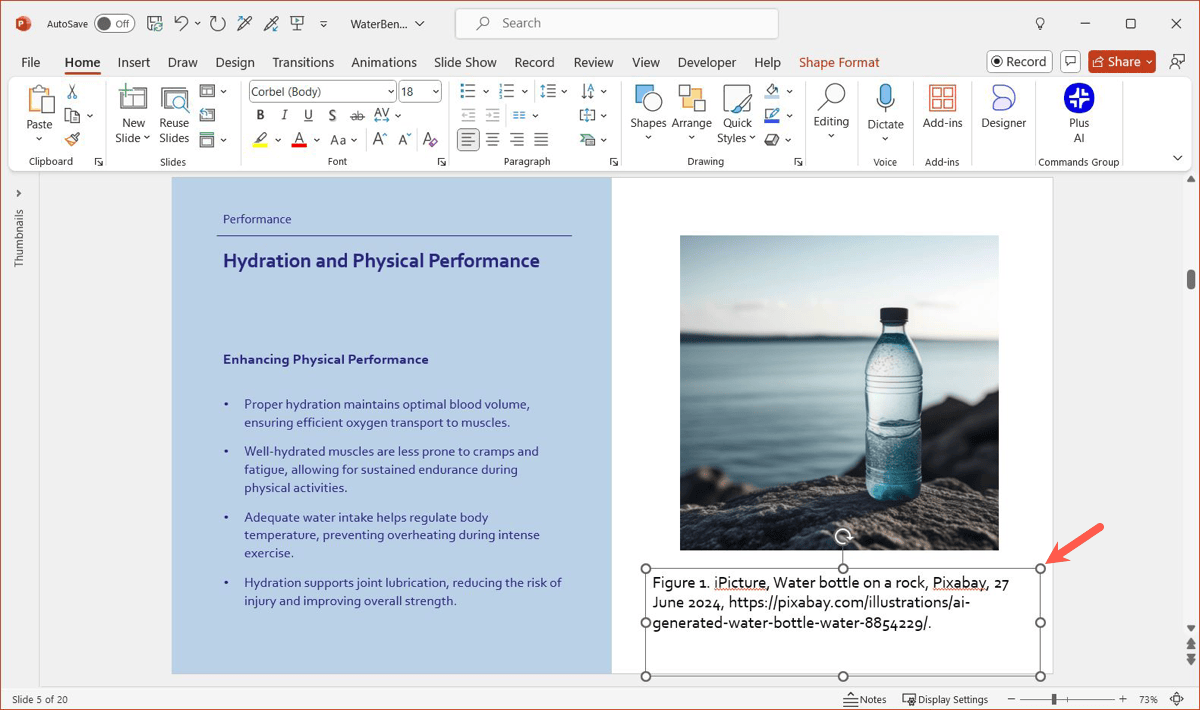
Presentations are meant to be fun, but they still need citations! When students ask how to cite a picture in a powerpoint, I tell them to put a small credit line right under the photo. You don’t want a huge paragraph of text blocking your slide. Just a small “Image by Smith (2024)” is usually enough. Then, on your very last slide, you can have a full list of all your sources. This keeps your slides looking clean and professional while still giving the artists the credit they deserve for their work.
Pro Tips for How to Cite a Picture in PowerPoint
If you want to be an expert on how to cite a picture in powerpoint, try using the “Notes” section at the bottom of your screen too. This is a great place to keep the full web links while you are working. When you finish your slides, check that every single image has a label. Even if you used a “Creative Commons” image that says it is free, it is still polite to mention the site. It makes you look like a pro who knows exactly what they are doing.
Common Mistakes When Citing Images
The biggest mistake people make is thinking that if it’s on the internet, it’s free to use without credit. That is not true! Another mistake is forgetting to include the date or the name of the website. Some people also get confused between APA and MLA styles. Pick one style and stick with it throughout your whole project. If you are not sure which one to use, always ask your teacher or boss first. Taking an extra minute to check your work can save you a lot of trouble later on.
Conclusion:
Now you know exactly how to cite a picture in many different ways! Whether you are using MLA for an English essay or APA for a science fair, you have the tools to succeed. Remember, citing isn’t just about following rules; it’s about being a fair and honest person. By giving credit to creators, you help build a world where everyone’s hard work is respected. Keep this guide handy for your next project, and you will never have to worry about image credits again. Happy writing!
FAQs
1. Can I just use a link to cite a picture?
No, just a link is usually not enough. Most styles require the creator’s name and the title of the work too.
2. What do I do if I can’t find the artist’s name?
If the name is missing, you can use the name of the website or the title of the image instead.
3. Is “Google” a valid source for a citation?
No, Google is a search engine, not the original source. You must click through to the actual website that hosts the image.
4. Do I need to cite images that are labeled “Free to Use”?
Yes, it is still a good habit to cite them. It shows where you got them and respects the “Creative Commons” rules.
5. How do I cite a picture I took myself?
If you took the photo, you usually don’t need a formal citation, but you can add a small note saying “Photo by Author.”
6. Where does the citation go in a document?
It usually goes in two places: a small note near the picture and a full entry in the bibliography at the end.